Managing Your Ads: the Two Switches and the Dashboard
How ads flow from inactive to active in Pilotbot, what the two switches ('In bot' and 'On P2P') really do, and why only you turn ads on.
Pilotbot Team
Author
On this page
Once you connect an exchange, your existing P2P ads appear in the dashboard automatically. Whether Pilotbot manages any given ad is entirely your decision — the bot never turns an ad on by itself. This article explains the dashboard layout and exactly what the two switches on every ad do.
The Dashboard at a Glance
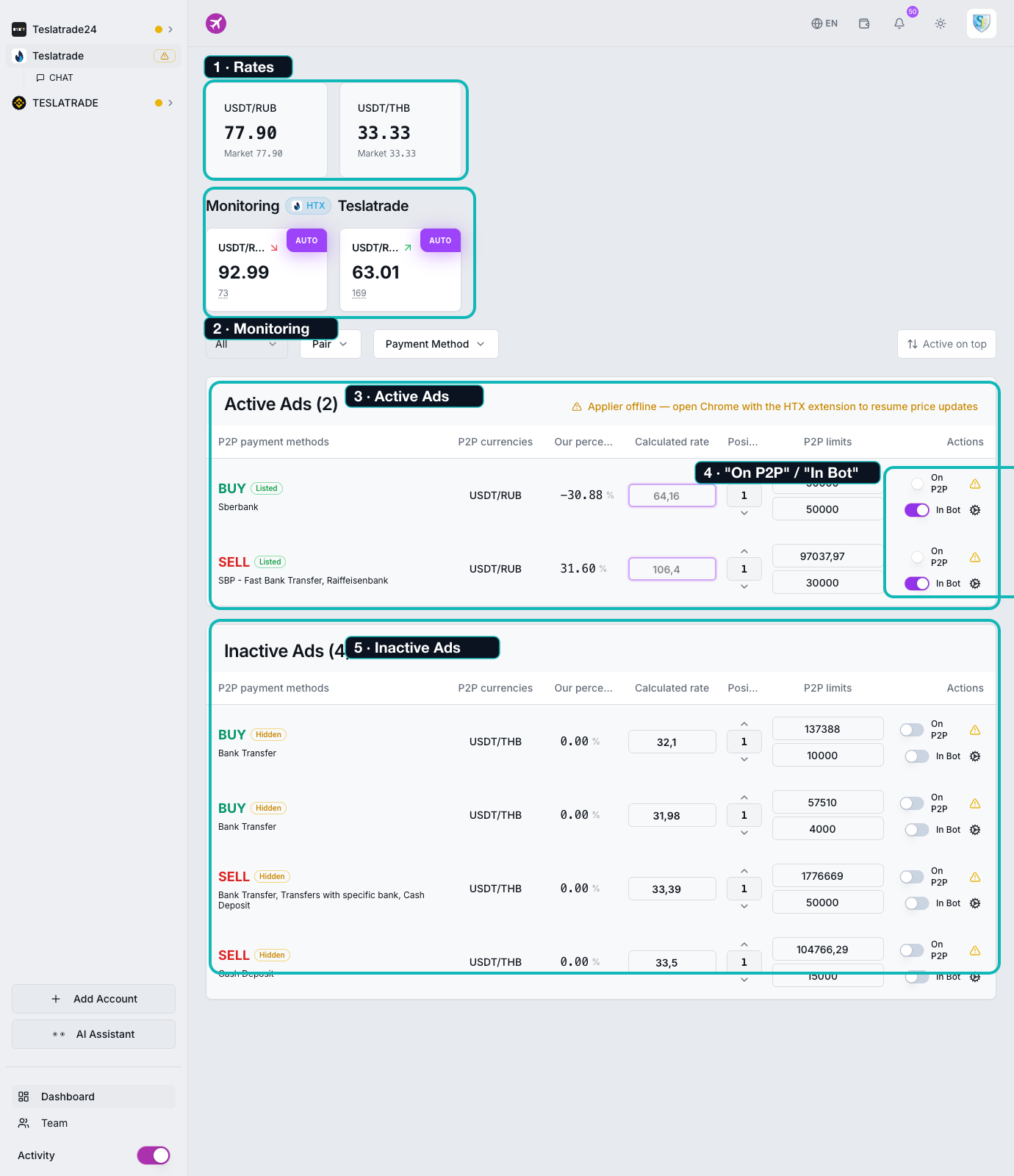
- Rates — the reference market rate for each pair (see rates explained).
- Monitoring — live cards showing each managed ad's price and position (see the worker monitor).
- Active ads — ads the bot is currently managing.
- The two switches —
On P2PandIn bot, on every ad row. - Inactive ads — ads Pilotbot can see but is not managing yet.
Where New Ads Arrive: Inactive
When your ads first sync in, they land in the Inactive ads section. Here the bot is not touching them — it only shows them, along with their columns: payment methods, currency pair, Our %, Calculated Rate, Position, and Limits. This is your staging area: you review and configure an ad here before letting the bot work it.
The Two Switches (They're Independent)
Every ad row has two separate switches, and turning one on does not turn the other on:
"In bot" — lets Pilotbot manage the price
Turn In bot on and two things happen:
- The ad moves into the Active ads section.
- The worker starts pricing it — repositioning it in the market every cycle, within your safety corridor.
This is the switch that hands an ad to the bot. Importantly, an ad can be In bot = on even if it isn't currently listed on the exchange — the two are separate.
"On P2P" — lists the ad on the exchange
On P2P reflects whether the ad is actually published (listed) on the exchange — Binance, Bybit, or HTX. Turn it on to list the ad, off to hide it. This mirrors the ad's real state on the exchange side.
The two combined
- In bot on + On P2P on — the ad is live on the exchange and the bot keeps it competitively priced. This is the normal working state.
- In bot on + On P2P off — the bot is ready to manage it, but the ad isn't shown to buyers yet.
- In bot off — the bot ignores the ad entirely, whatever its exchange state.
Only You Turn Ads On
Pilotbot is built so enabling an ad is always a deliberate action by you, the owner. The bot reads your ads but will never flip In bot on for you. The one automatic action only ever turns things off: if an ad goes offline on the exchange while the bot was managing it, Pilotbot switches In bot off for that ad (and the dashboard tells you why). Your settings, like target position, are kept for when you bring it back.
Configuring an Ad Before You Turn It On
Next to the switches is a gear icon that opens the ad's settings — target position, overtake step, max deviation, and the limit and competitor filters. Set those first, then turn In bot on. See all the ad settings explained.